Garmin G500/G600 TXi Upgrades at KPTK
Garmin's TXi-series flight displays bring touchscreen glass to pistons and turboprops alike. Michigan Aviation installs and services G500 TXi and G600 TXi systems at Oakland County International Airport, including the GAD 43e adapter work that keeps legacy autopilots flying with modern glass.
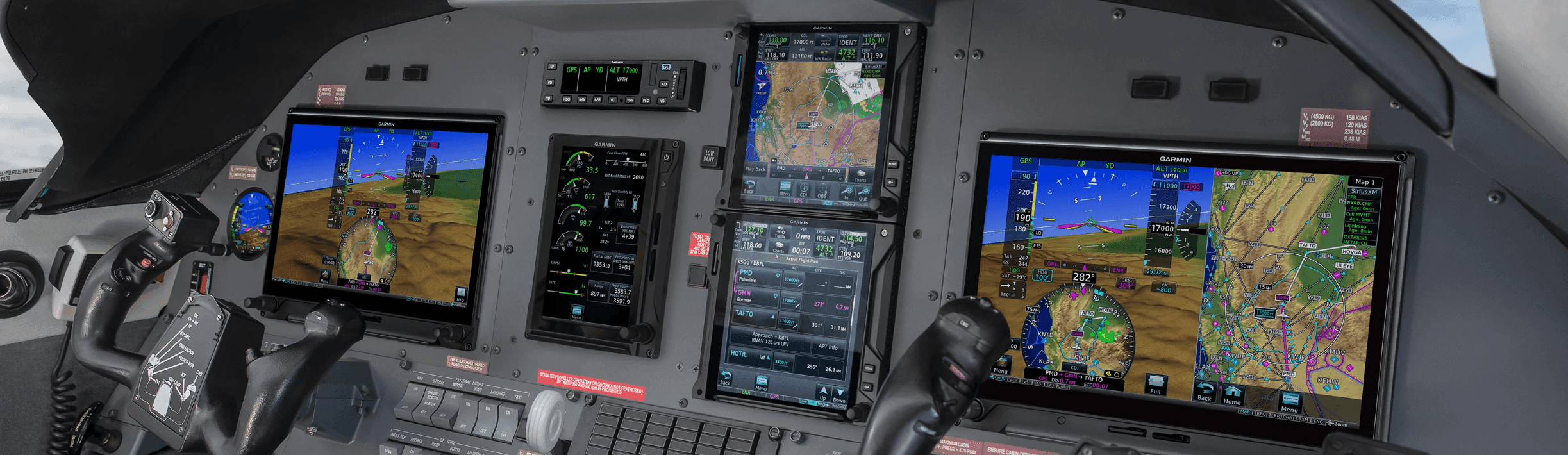
Garmin G600 TXi installation in a turboprop panel
What We Offer
TXi upgrade support
- G500 TXi and G600 TXi flight display installation and configuration
- Engine indication (EIS) display integration where applicable
- GAD 43/43e adapter installation, configuration, and software updates
- Autopilot and navigator integration planning
- Coordination with on-site FAA-certified maintenance during downtime
Why TXi
Flexible glass for a wide range of aircraft
The TXi line spans display sizes and configurations, from a single PFD in a piston single to multi-display panels with engine indication in turboprops. That flexibility makes TXi a strong fit for owners who want modern glass without changing everything in the panel at once.
Our team also handles the details that make TXi installations work well over time, including GAD 43e adapter configuration and software updates that affect autopilot behavior. Owners with existing Garmin glass should review our note on the GAD 43e software update for G500 TXi, G600, and G700. If you are comparing TXi against newer options, see our AXIS vs G3X Touch vs G500 TXi comparison.
FAQ
TXi Questions
What is the difference between G500 TXi and G600 TXi?
Both are Garmin TXi-series flight displays. The G500 TXi serves Part 23 Class I/II piston aircraft, while the G600 TXi is aimed at higher-performance and turbine aircraft. We help you confirm which system applies to your airplane.
Do you service existing TXi installations?
Yes. We support existing G500 TXi and G600 TXi installations, including configuration changes, display additions, and GAD 43e adapter software updates that affect autopilot and gyro emulation behavior.
Can TXi displays integrate with my existing autopilot?
In many aircraft, yes. TXi displays interface with a range of legacy autopilots through the GAD 43e adapter, and pair natively with the Garmin GFC 500 and GFC 600. We review your current equipment and plan the right integration path.
How does TXi compare to the new Garmin AXIS system?
Garmin’s new AXIS Flight Display System targets a similar certified aircraft category. Which fits best depends on your aircraft eligibility, panel space, current equipment, and integration goals. We can walk you through both.
Ready for TXi glass?
Talk with our avionics team about which TXi configuration fits your aircraft and how to plan the installation.
To connect equipment comparisons and aircraft eligibility with installation planning, explore avionics repair and installation at KPTK, Garmin AXIS installation planning, Garmin G3X Touch retrofit services, Garmin GFC 500 and 600 autopilot installations, how to check Garmin AXIS aircraft compatibility and the AXIS, G3X Touch and G500 TXi comparison.
Last updated: